Pagelet
Implements the basic Material Design visual layout structure.
Use it for projects that require a "page within a page" layouts with its own
AppBar, BottomAppBar, NavigationDrawer,
such as demos and galleries.
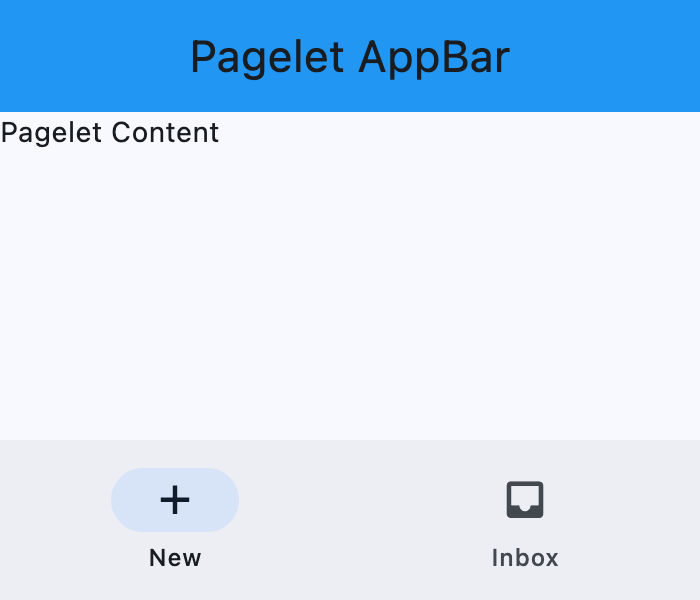
Basic Pagelet
Inherits: LayoutControl, AdaptiveControl
Properties
-
appbar(AppBar | CupertinoAppBar | None) –An
AppBarcontrol to display at the top of the Pagelet. -
bgcolor(ColorValue | None) –Background color of this Pagelet.
-
bottom_appbar(BottomAppBar | None) –A
BottomAppBarcontrol to display at the bottom of this Pagelet. -
bottom_sheet(Control | None) –The persistent bottom sheet to show information that supplements the primary content of this Pagelet.
-
content(Control) –A child Control contained by this Pagelet.
-
drawer(NavigationDrawer | None) –A
NavigationDrawercontrol to display as a panel sliding from the start edge of the page. -
end_drawer(NavigationDrawer | None) –A
NavigationDrawercontrol to display as a panel sliding from the end edge of the page. -
floating_action_button(Control | None) – -
floating_action_button_location(FloatingActionButtonLocation | OffsetValue | None) –Defines the position of the
floating_action_button. -
navigation_bar(NavigationBar | CupertinoNavigationBar | None) –A navigation bar (
NavigationBarorCupertinoNavigationBar) control to display at the bottom of thePagelet.
Methods
-
close_drawer–Close the drawer.
-
close_end_drawer–Close the end drawer.
-
show_drawer–Show the drawer.
-
show_end_drawer–Show the end drawer.
Examples#
Basic example#
import asyncio

import flet as ft


def main(page: ft.Page):
    page.horizontal_alignment = ft.MainAxisAlignment.CENTER
    page.vertical_alignment = ft.CrossAxisAlignment.CENTER

    async def handle_show_drawer(e: ft.Event[ft.FloatingActionButton]):
        await pagelet.show_drawer()

    async def handle_show_end_drawer(e: ft.Event[ft.Button]):
        await pagelet.show_end_drawer()
        await asyncio.sleep(3)
        await pagelet.close_end_drawer()

    page.add(
        ft.SafeArea(
            content=(
                pagelet := ft.Pagelet(
                    width=500,
                    height=500,
                    appbar=ft.AppBar(
                        title=ft.Text("Pagelet AppBar"),
                        center_title=True,
                        bgcolor=ft.Colors.RED_500,
                    ),
                    content=ft.Text("Pagelet Body"),
                    bgcolor=ft.Colors.SURFACE_CONTAINER_HIGHEST,
                    bottom_appbar=ft.BottomAppBar(
                        bgcolor=ft.Colors.BLUE,
                        shape=ft.CircularRectangleNotchShape(),
                        content=ft.Row(
                            controls=[
                                ft.IconButton(
                                    icon=ft.Icons.MENU, icon_color=ft.Colors.WHITE
                                ),
                                ft.Container(expand=True),
                                ft.IconButton(
                                    icon=ft.Icons.SEARCH, icon_color=ft.Colors.WHITE
                                ),
                                ft.IconButton(
                                    icon=ft.Icons.FAVORITE, icon_color=ft.Colors.WHITE
                                ),
                            ],
                        ),
                    ),
                    drawer=ft.NavigationDrawer(
                        on_dismiss=lambda e: print("Drawer dismissed"),
                        controls=[
                            ft.NavigationDrawerDestination(
                                icon=ft.Icons.ADD_TO_HOME_SCREEN_SHARP,
                                label="Item 1",
                            ),
                            ft.NavigationDrawerDestination(
                                icon=ft.Icons.ADD_COMMENT,
                                label="Item 2",
                            ),
                        ],
                    ),
                    end_drawer=ft.NavigationDrawer(
                        on_dismiss=lambda e: print("End Drawer dismissed"),
                        controls=[
                            ft.NavigationDrawerDestination(
                                icon=ft.Icons.SLOW_MOTION_VIDEO,
                                label="Item 3",
                            ),
                            ft.NavigationDrawerDestination(
                                icon=ft.Icons.INSERT_CHART,
                                label="Item 4",
                            ),
                        ],
                    ),
                    floating_action_button=ft.FloatingActionButton(
                        icon=ft.Icons.ADD,
                        shape=ft.CircleBorder(),
                    ),
                    floating_action_button_location=ft.FloatingActionButtonLocation.CENTER_DOCKED,
                )
            ),
        )
    )


if __name__ == "__main__":
    ft.run(main)
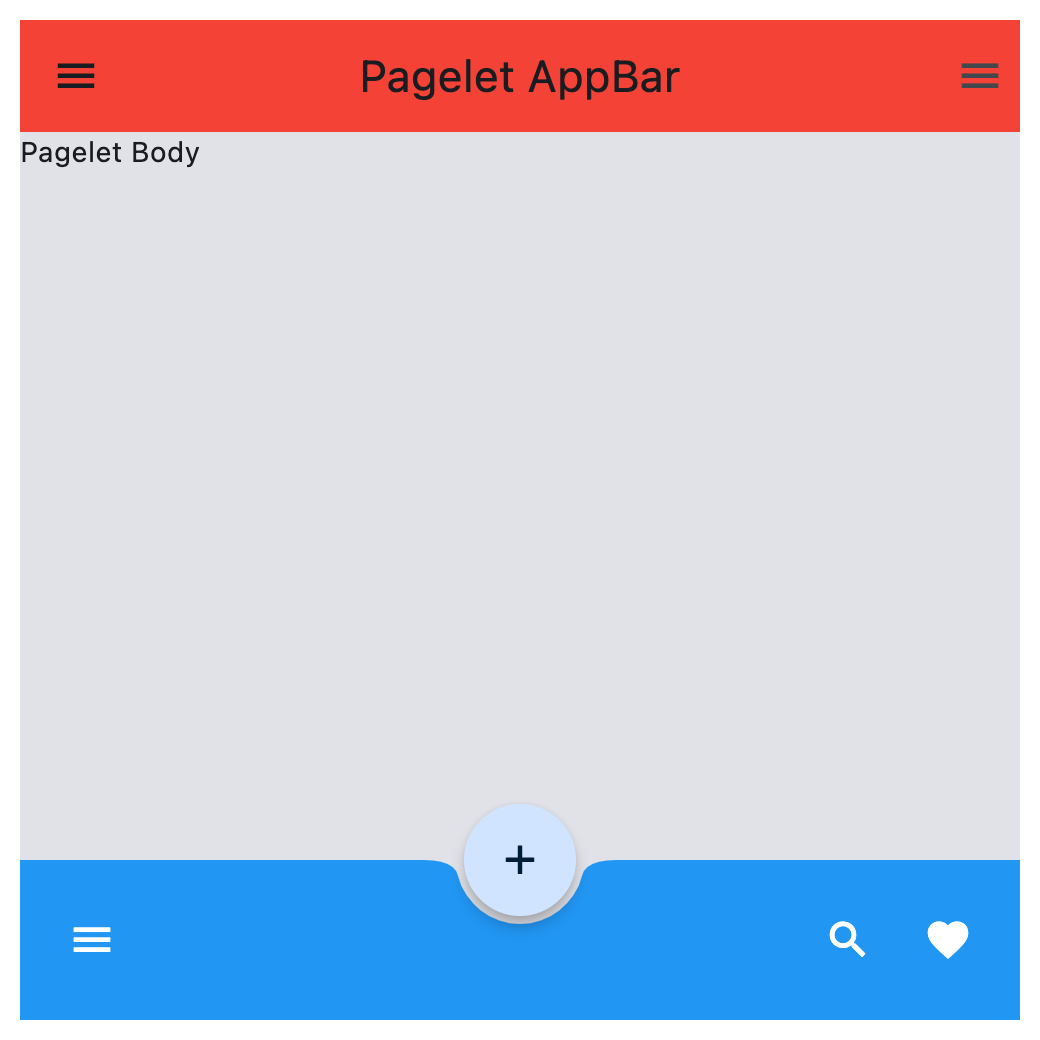
Properties#
class-attribute
instance-attribute
#
appbar: AppBar | CupertinoAppBar | None = None
An AppBar control to display at the top of the Pagelet.
class-attribute
instance-attribute
#
bgcolor: ColorValue | None = None
Background color of this Pagelet.
class-attribute
instance-attribute
#
bottom_appbar: BottomAppBar | None = None
A BottomAppBar control to display at the bottom of this Pagelet.
Note
If both the bottom_appbar and navigation_bar
properties are specified, bottom_appbar takes precedence and will
be displayed.
class-attribute
instance-attribute
#
bottom_sheet: Control | None = None
The persistent bottom sheet to show information that supplements the primary content of this Pagelet.
instance-attribute
#
content: Control
A child Control contained by this Pagelet.
The control in the content of the Pagelet is positioned at the top-left of the available space between the app bar and the bottom of the Pagelet.
Raises:
-
ValueError–If it is not visible.
class-attribute
instance-attribute
#
drawer: NavigationDrawer | None = None
A NavigationDrawer control to display as a panel sliding from the start edge of the page.
class-attribute
instance-attribute
#
end_drawer: NavigationDrawer | None = None
A NavigationDrawer control to display as a panel sliding from the end edge of the page.
class-attribute
instance-attribute
#
floating_action_button: Control | None = None
A FloatingActionButton
control to display on top of this Pagelet's content.
class-attribute
instance-attribute
#
floating_action_button_location: (
    FloatingActionButtonLocation | OffsetValue | None
) = END_FLOAT
Defines the position of the floating_action_button.
class-attribute
instance-attribute
#
navigation_bar: (
    NavigationBar | CupertinoNavigationBar | None
) = None
A navigation bar (NavigationBar or CupertinoNavigationBar) control to display at the bottom of the Pagelet.
Note
If both the navigation_bar and bottom_appbar
properties are specified, navigation_bar takes precedence and will
be displayed.